EZOutlookSync
EZOutlookSync offers industry-strength performance for fast and robust synchronization of Outlook data between two or more computers. In addition to synchronization, EZOutlookSync can provide comprehensive data backup. It also streamlines the migration of your Outlook data to another system.
Main Features
-
Lighting fast and smart synchronization of:
- Contacts
- Distribution lists
- Calendar
- Tasks
- Notes
- Journal entries
- Two synchronization modes: both-way or unilateral
- Easy to use wizard walks you through your first synchronization in three simple steps
- Individual synchronization options can be saved in a profile for later use
- Ability to set up automatic scheduled synchronizations
- Options to limit data and time span for synchronization
- Highly customizable settings for comparison of items during synchronization
- Command Line support
Screenshots

Main Window
Here you can select Outlook data for synchronization, choose which folders to sync and using which direction.
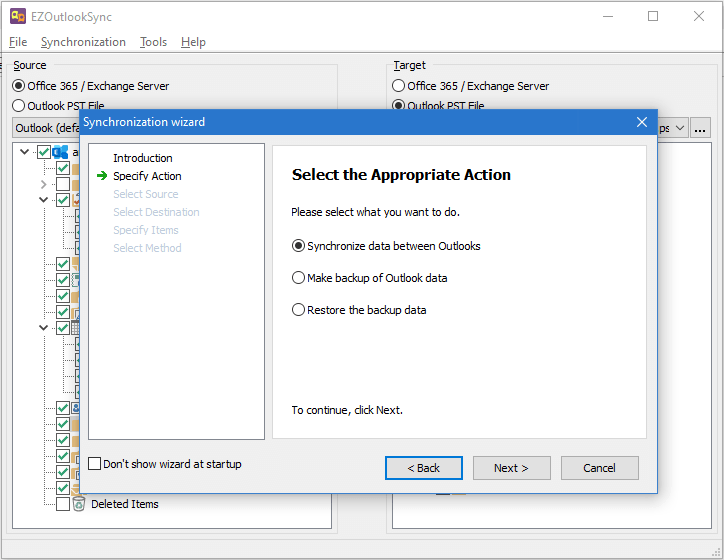
Synchronization Wizard
Easy to use synchronization wizard for novice users helps you to achieve the desired synchronization results in three easy steps. Give it a try!

Synchronization Summary
Synchronization summary window is shown before sync and lists the detailed information about which items are to be synchronized.

Synchronization Process
Displays overall synchronization progress and a number of processed items.
Get started with EZOutlookSync
You will be able purchase the license at any time during the 30-day free trial period.
Supported Outlook versions:
2007, 2010, 2013, 2016, 2019, Outlook 365.
Pricing
The EZOutlookSync license includes:
- Unlimited full synchronizations
- Priority lifetime support services
- Unconditional 30 days money back guarantee
The license allows you to keep version you purchased forever. In addition, you are entitled to free updates during one year since purchase date
Renewal Options
If you already own a license and wish to renew it.